| Message Content |
[What and why]
We’re introducing a new security reporting capability in Microsoft Teams meetings that allows meeting participants to report suspicious, malicious, or potentially fraudulent behavior during or after a meeting.
This capability helps organizations identify and investigate threats such as phishing attempts, impersonation, scams, social engineering, and other suspicious activity. Submitted reports provide additional security signals that can be reviewed by administrators in Microsoft security and administration tools to support investigation and response workflows.
This message is associated with Microsoft 365 Roadmap ID 569207.
[Rollout schedule]
- Targeted Release: Beginning in late September 2026 and expected to complete by late September 2026
- General Availability (Worldwide): Beginning in mid-October 2026 and expected to complete by late October 2026
[Impact on your organization]
Who is affected
- Users participating in Microsoft Teams meetings on Windows, Mac, and web
Platforms and services
- Microsoft Teams
- Microsoft Defender portal
- Teams admin center
What will happen
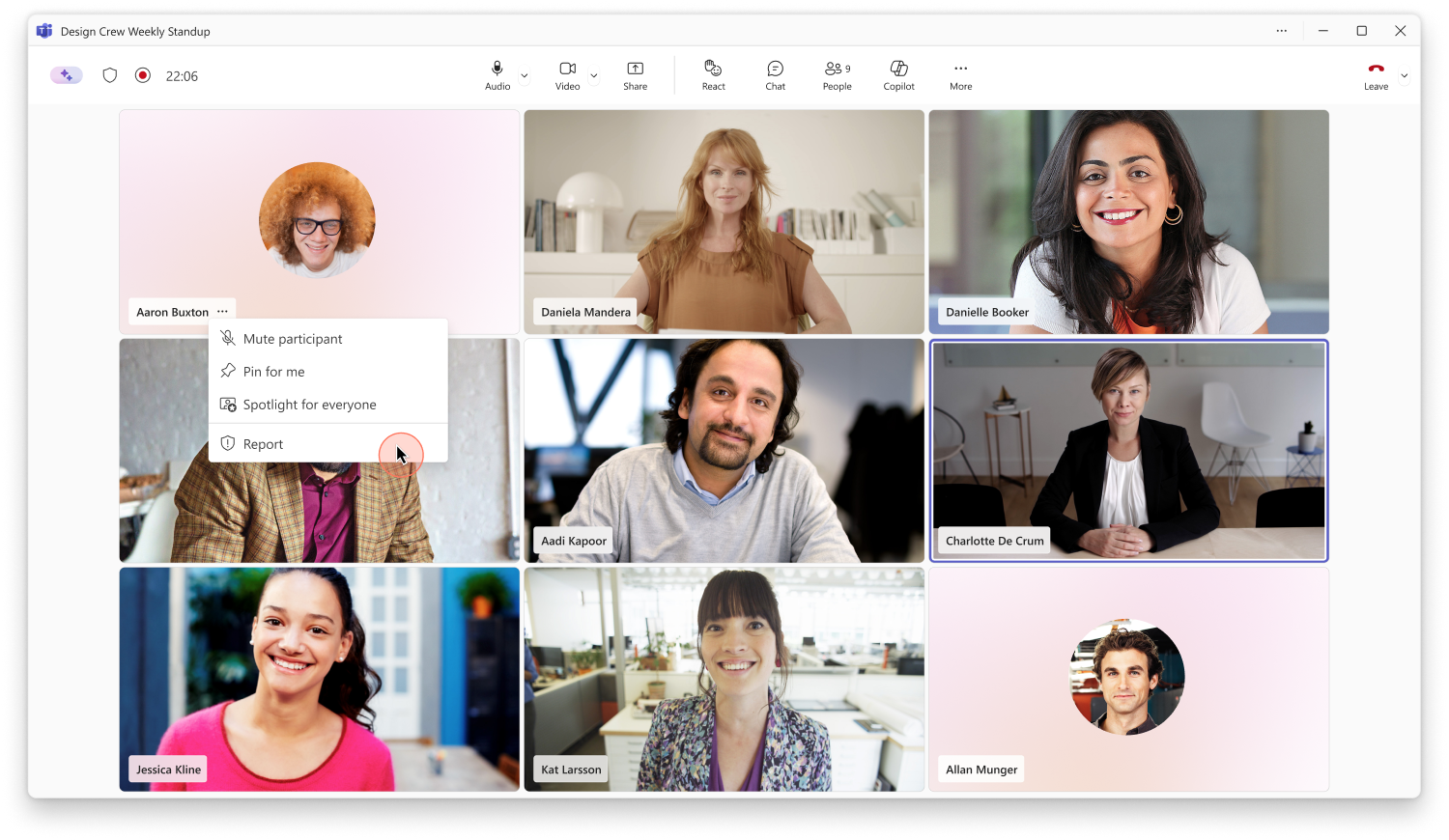
- Users will see a new Report a concern option in the participant tile and participant pane during Teams meetings:
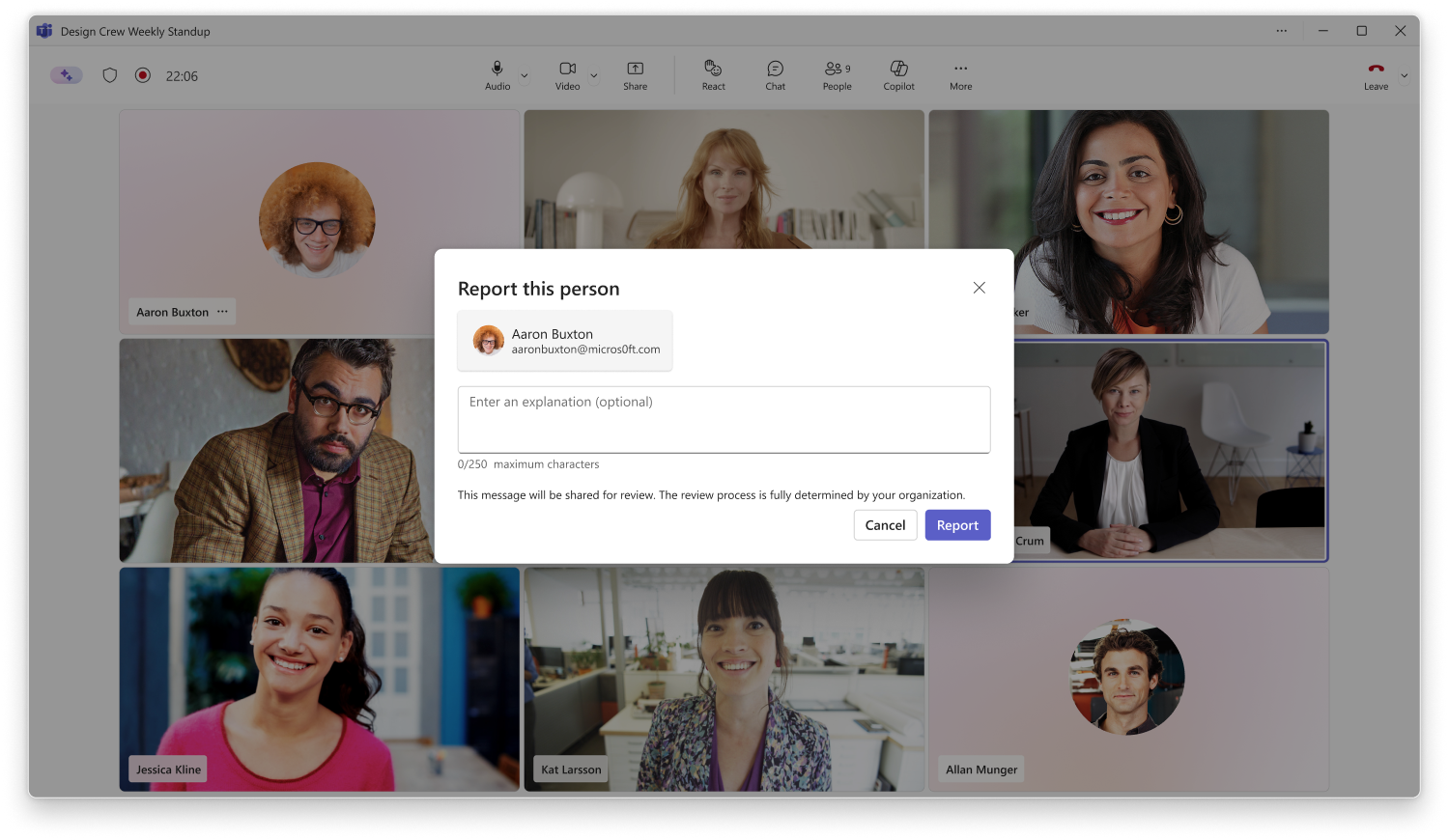
- Users will be able to report suspected phishing attempts, impersonation, scams, social engineering activity, and other security concerns directly from Teams meetings:
- Users will also be able to mark a previously reported participant as Not a concern.
- Relevant meeting metadata and limited contextual information will be collected to support security investigations and remediation activities.
- Information associated with reported meetings will be available for administrator review and investigation.
- Organizations with Microsoft Defender for Office 365 Plan 1, Microsoft Defender for Office 365 Plan 2, or Microsoft Defender XDR will be able to review detailed reported meeting submissions in the Microsoft Defender portal.
- Report information will also be available in the Teams admin center under Protection reports > User-reported security submissions.
- Administrators can investigate reported meetings and take actions according to their organization’s security processes and policies.
- This capability will be enabled by default.
[Action required and recommendations]
Review your organization’s security investigation and incident response processes before rollout.
Recommended actions:
- Review Microsoft Defender user reporting settings and ensure reporting workflows align with organizational requirements.
- If your organization uses Microsoft Defender for Office 365 or Microsoft Defender XDR, verify that Teams meeting reporting is configured appropriately so detailed submissions are available to security investigators.
- Inform users about the new Report a concern capability and when it should be used.
- Inform users about the Not a concern option and when it should be used.
- Update security awareness training, incident response documentation, and internal guidance as needed.
- Verify that security administrators responsible for reviewing reports have the appropriate access to the Microsoft Defender portal or Teams admin center.
[Compliance considerations]
| Question |
Answer |
| Does this change provide a new way for users to communicate security concerns to their organization? |
Yes. Users will be able to report suspected phishing attempts, impersonation, scams, social engineering activity, and other security concerns directly from Microsoft Teams meetings. |
| Does this change collect new customer or user data for investigation purposes? |
Yes. Relevant meeting metadata and limited contextual information will be collected and made available to support security investigation and remediation activities. |
| Does this change alter how administrators monitor, investigate, or report on security-related activities? |
Yes. Administrators will be able to review and investigate reported meetings through the Microsoft Defender portal and the Teams admin center. |
| Does this change introduce new reporting or compliance-related records that administrators can review? |
Yes. User-submitted meeting security reports will be available in the Teams admin center under Protection reports > User-reported security submissions and, where licensed, in the Microsoft Defender portal. |
|
| Machine Translation |
[何となぜ]
Microsoft Teamsの会議に新しいセキュリティ報告機能を導入し、会議中または会議後に不審、悪意、または潜在的な詐欺的な行動を報告できるようにします。
この機能は、フィッシング未遂、なりすまし、詐欺、ソーシャルエンジニアリング、その他の不審な活動などの脅威を特定し調査するのに役立ちます。提出されたレポートは、Microsoftのセキュリティおよび管理ツールで管理者が確認できる追加のセキュリティシグナルを提供し、調査や対応ワークフローを支援します。
このメッセージはMicrosoft 365 Roadmap ID 569207に関連付けられています。
[展開スケジュール]
- リリース予定: 2026年9月下旬から始まり、2026年9月下旬までに完了予定
- 一般公開(世界展開): 2026年10月中旬から始まり、2026年10月下旬までに完了予定です
[組織への影響]
影響を受ける人物
- Windows、Mac、WebでMicrosoft Teams会議に参加するユーザー
ホームとサービス
- Microsoft Teams
- Microsoft Defender ポータル
- Teams管理センター
何が起こるのか
- Teams会議中に、参加者タイルと参加者ペインに新しい 「懸念を報告」 オプションが表示されます。
- ユーザーはTeamsの会議から、疑わしいフィッシング未遂、なりすまし、詐欺、ソーシャルエンジニアリング活動、その他のセキュリティ上の懸念を直接報告できるようになります。
- また、過去に報告された参加者を 「問題なし」としてマークすることも可能です。
- 関連する会議メタデータおよび限定的な文脈情報が収集され、セキュリティ調査および是正活動を支援します。
- 報告された会議に関連する情報は管理者のレビューおよび調査のために利用可能です。
- Microsoft Defender for Office 365 Plan 1、Microsoft Defender for Office 365 Plan 2、またはMicrosoft Defender XDRを所持している組織は、 Microsoft Defenderポータルで詳細な報告会議提出を確認できます。
- 報告情報は 、Teams管理センター の 保護報告>ユーザー報告のセキュリティ提出にも掲載されます。
- 管理者は報告された会議を調査し、組織のセキュリティプロセスやポリシーに従って対応を取ることができます。
- この機能は デフォルトで有効になります。
[行動が必要と提言]
導入前に、組織のセキュリティ調査およびインシデント対応プロセスをレビューしてください。
推奨される行動:
- Microsoft Defenderのユーザーレポート設定を確認し、レポートワークフローが組織の要件に合致しているか確認してください。
- 御社がMicrosoft Defender for Office 365またはMicrosoft Defender XDRを使用している場合は、Teamsの会議報告が適切に設定されているかを確認し、詳細な提出がセキュリティ調査員に利用可能であることを確認してください。
- 新しい懸念報告機能と使用時期についてユーザーに知らせてください。
- 「問題ない」オプションと使用時期についてユーザーに知らせてください。
- 必要に応じてセキュリティ意識向上のトレーニング、インシデント対応の文書、社内ガイダンスを更新してください。
- レポートのレビューを担当するセキュリティ管理者がMicrosoft DefenderポータルやTeams管理センターに適切なアクセス権を持っているか確認してください。
[コンプライアンスの考慮事項]
| 質問 |
回答 |
| この変更は、ユーザーが組織にセキュリティ上の懸念を伝える新しい方法を提供しますか? |
はい。ユーザーはMicrosoft Teamsの会議から、フィッシングの疑い、なりすまし、詐欺、ソーシャルエンジニアリング活動、その他のセキュリティ上の懸念を直接報告できるようになります。 |
| この変更は調査目的で新しい顧客データやユーザーデータを収集するものですか? |
はい。関連する会議メタデータおよび限定的な文脈情報が収集され、セキュリティ調査および是正活動を支援するために提供されます。 |
| この変更は、管理者がセキュリティ関連活動を監視、調査、報告する方法に変化をもたらしますか? |
はい。管理者はMicrosoft DefenderポータルやTeams管理センターを通じて報告された会議を確認・調査できます。 |
| この変更により、管理者が確認できる新たな報告やコンプライアンス関連の記録が導入されますか? |
はい。ユーザーが提出した会議のセキュリティレポートは 、Teams管理センター の 保護レポート>ユーザーレポート のセキュリティ提出、ライセンスがあればMicrosoft Defenderポータルで閲覧可能です。 |
|