| MC1472025 | Microsoft SharePoint: PowerShell support for brand fonts deletion |
|---|
| Classification | stayInformed |
|---|---|
| Last Updated | 09/14/2026 23:20:08 |
| Start Time | 09/14/2026 23:18:14 |
| End Time | 12/31/2026 08:00:00 |
| Message Content |
[What and why:] Microsoft SharePoint is introducing PowerShell support for deleting brand font files from the Brand Fonts library used by the SharePoint Brand Center. With the new Remove-SPOFontFile cmdlet, SharePoint administrators can remove brand font files that are no longer approved, licensed, or needed across their organization in SharePoint. This cmdlet is the supported deletion path for brand fonts for SharePoint. It is designed to help admins manage font lifecycle and avoid cross-geo inconsistencies by removing font copies across the primary geo and satellite geos. When a deleted font is referenced by existing SharePoint sites or pages, the content will continue to be rendered using a Microsoft-defined fallback font. Font packages that reference deleted fonts are not automatically deleted. They remain available for use, but a warning message is displayed when required fonts are unavailable. [Rollout schedule:] General Availability (Worldwide): We will begin rolling out on late September 2026 and expect to complete by mid-October 2026. [Impact on your organization:] Note: Brand font management in Brand Center currently depends on the SharePoint Public CDN and is available only to customers who have Public CDN enabled.
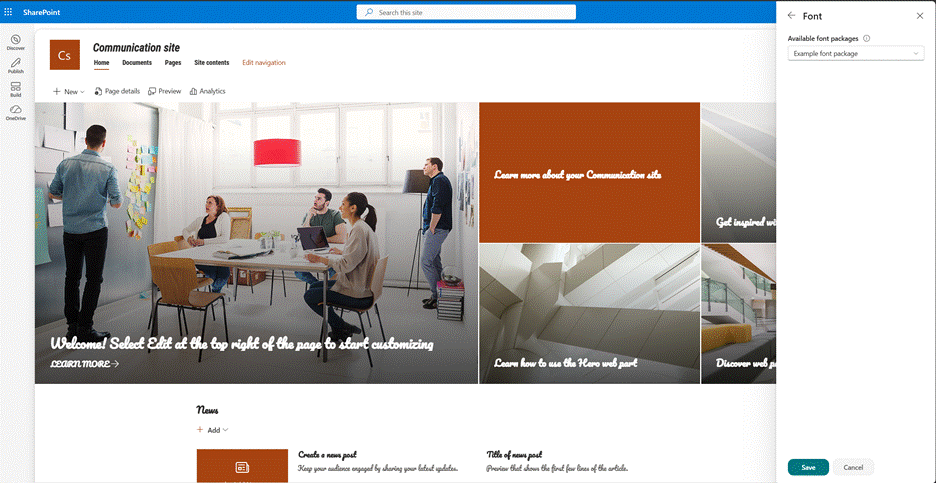
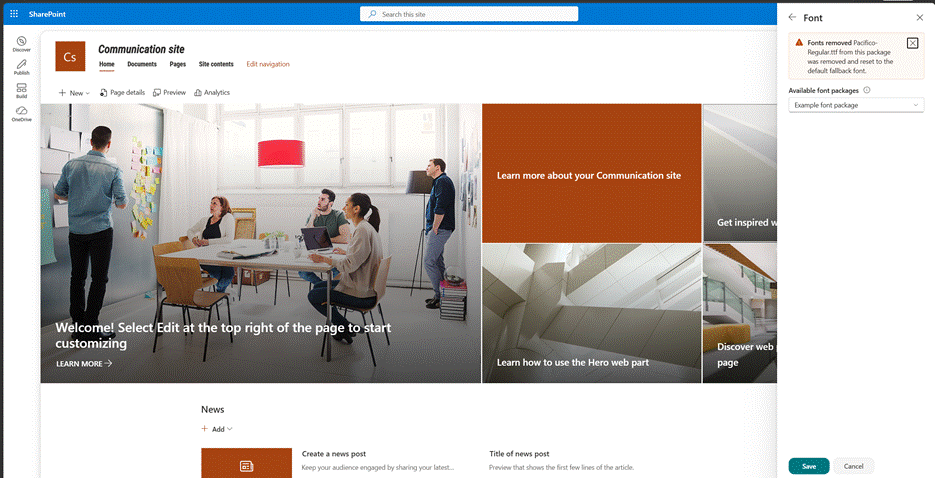
Example results of running the cmdlet
Before deleting the font
After deleting the font
[Action required / Recommendations:]
|
| Machine Translation |
[何を、なぜ:] Microsoft SharePointは、SharePoint Brand Centerで使用されるBrand Fontsライブラリからブランドフォントファイルを削除するためのPowerShellサポートを導入しています。新しいRemove-SPOFontFile コマンドレットにより、SharePoint管理者は組織全体で承認・ライセンス・必要とされていないブランドフォントファイルを削除できます。 このコマンドレットは、 SharePointのブランドフォントに関するサポート済み削除パスです。管理者がフォントライフサイクルを管理し、主要なジオおよび衛星ジオのフォントコピーを削除することで、ジオ間不整合を避けるために設計されています。 削除されたフォントが既存のSharePointサイトやページで参照されている場合、そのコンテンツはMicrosoftが定義したフォールバックフォントでレンダリングされ続けます。削除されたフォントを参照するフォントパッケージは自動的に削除されるわけではありません。使用可能には残りますが、必要なフォントが利用できない場合は警告メッセージが表示されます。 [展開スケジュール:] 一般展開(世界展開):2026年9月下旬から展開を開始し、2026年10月中旬までに完了する予定です。 [組織への影響:] 注:Brand Centerのブランドフォント管理は現在、SharePoint Public CDNに依存しており、Public CDNが有効になっている顧客のみが利用可能です。
コマンドレット実行の例
フォントを削除する前に
フォントを削除した後
[必要な行動/推奨事項:]
|