SHD / MC Checker

MC1446799 | (Updated) Microsoft Teams: Multilingual meeting recaps support personalized recap translation


MC1446799 | (Updated) Microsoft Teams: Multilingual meeting recaps support personalized recap translation

Classification planForChange
Last Updated 09/15/2026 16:54:23
Start Time 08/03/2026 22:20:09
End Time 11/10/2026 07:00:00
Message Content

Updated September 15, 2026: We have updated the timeline. Thank you for your patience. 

[What and why]

We are improving the multilingual meeting experience in Microsoft Teams by personalizing meeting recaps based on the language each participant selected during the meeting through translated captions or Teams Interpreter.

After a meeting ends, users will initially see the meeting recap in the translation or interpretation language they selected during the meeting. They can also choose a different supported language after the recap is generated.

This update helps participants review meeting content in the language they used during the meeting, improving accessibility and continuity for multilingual collaboration.

This message is associated with Microsoft 365 Roadmap ID 567458.

[Rollout schedule]

  • Targeted Release: Beginning in early August 2026 and expected to complete by mid-August 2026
  • General Availability (Worldwide, GCC, GCC High): Beginning in mid-August 2026 and expected to complete by early October 2026 (previously early September)

[Impact on your organization]

Who is affected

Users who:

  • Access meeting recaps in Microsoft Teams
  • Use translated captions during meetings
  • Use Teams Interpreter during meetings
  • Have the required licenses and access to Teams meeting recap features

Platforms and services

  • Microsoft Teams for Windows and Mac desktop
  • Microsoft Teams on the web
  • Microsoft Teams for iOS
  • Microsoft Teams for Android
  • Teams meeting recap

What will happen

After rollout:

  • Meeting recaps will initially be displayed in the translation or interpretation language selected by each participant during the meeting.
  • Different participants in the same meeting may see the recap in different languages based on their own language selections.
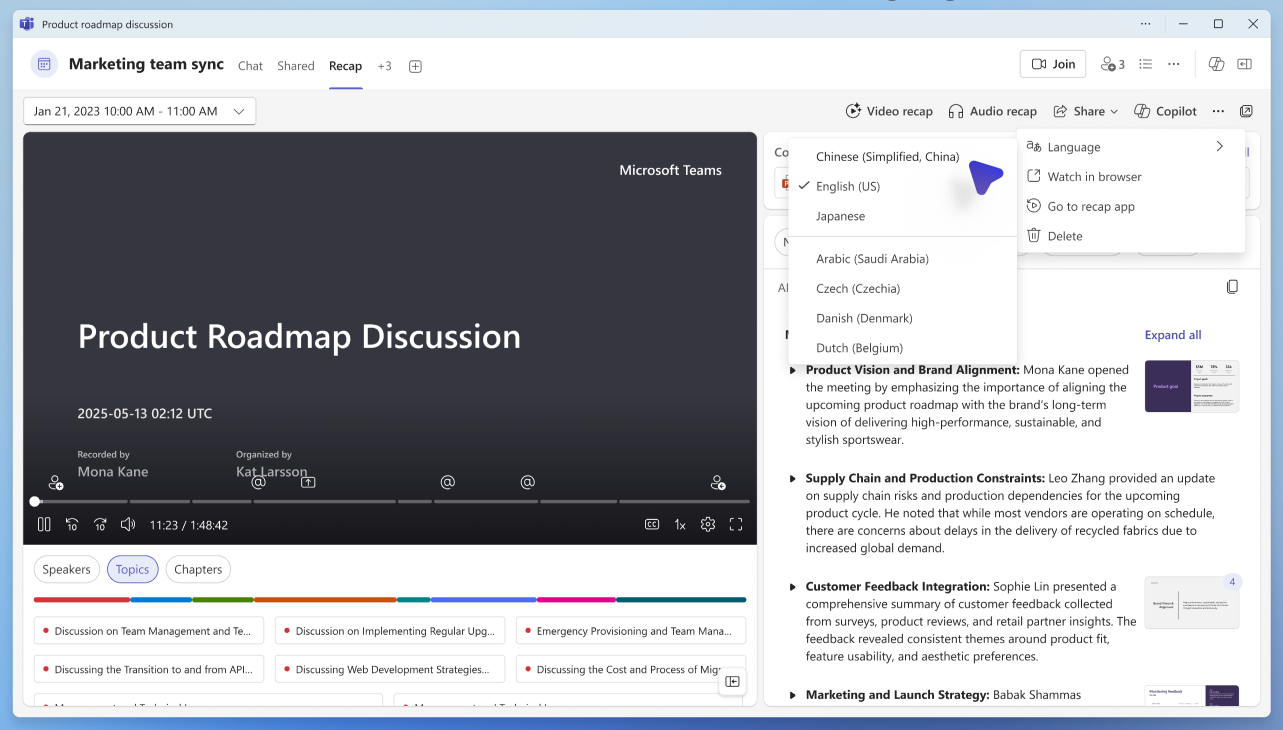
  • Users can change the recap language after it is generated by selecting another supported language: 

  • Changing the recap language affects only how the recap is displayed for that user. It does not modify the original transcript, recording, or source meeting content.

For example, if a participant selects Japanese as their translation or interpretation language during an English-language meeting, their meeting recap will initially be displayed in Japanese.

Availability depends on supported languages and meeting configuration.

[Action required and recommendations]

No administrative action is required.

We recommend that you:

  • Inform help desk and support teams about this updated multilingual recap experience.
  • Update internal documentation for translated captions, Teams Interpreter, and meeting recap experiences.
  • Verify that eligible users have the licenses required to access Teams meeting recap features.
  • Review organizational policies related to transcription, recording, captions, Teams Interpreter, and meeting recap experiences, as applicable.
  • Inform users that meeting recaps may initially appear in the language they selected during the meeting and that they can choose a different supported language from the recap experience.

The feature will be enabled automatically as rollout reaches your organization.

Learn more

[Compliance considerations]

No compliance considerations identified. Review as appropriate for your organization.

Machine Translation

2026年9月15日更新:タイムラインを更新しました。ご辛抱いただきありがとうございます。 

[何となぜ]

Microsoft Teamsでは、会議中に選んだ言語ごとに翻訳字幕やTeams通訳を通じて会議の要集をパーソナライズすることで、多言語会議体験を向上させています。

会議終了後、ユーザーは会議中に選択した翻訳または通訳言語で会議の要約を最初に見ることができます。また、要約が生成された後は、別の対応言語を選択することもできます。

このアップデートにより、参加者は会議中に使用した言語で会議内容を再確認でき、多言語協力のアクセシビリティと継続性が向上します。

このメッセージはMicrosoft 365 Roadmap ID 567458に関連付けられています。

[展開スケジュール]

  • リリース予定: 2026年8月初旬から 2026年8月中旬までに完了予定
  • 一般稼働開始(世界、GCC、GCCハイ): 2026年8月中旬 開始 、 2026年10月初旬 (以前は9月初旬)までに完了予定です。

[組織への影響]

影響を受ける人物

以下の利用者:

  • Microsoft Teamsで会議のまとめにアクセスする
  • 会議中は翻訳済みキャプションを使いましょう
  • 会議中にTeamsインタープリターを使いましょう
  • 必要なライセンスとTeams会議のまとめ機能へのアクセスが必要です

ホームとサービス

  • Windows および Mac デスクトップ向け Microsoft Teams
  • Microsoft Teams on the web(ウェブ版)
  • Microsoft Teams for iOS
  • Microsoft Teams for Android
  • チームミーティングのまとめ

何が起こるのか

展開後:

  • 会議の要約は、参加者が会議中に選択した翻訳または通訳言語で最初に表示されます。
  • 同じ会議の異なる参加者は、それぞれの言語選択に基づいて異なる言語でまとめを見ることがあります。
  • ユーザーは、生成後に他の対応言語を選択することで、まとめ言語を変更できます: 

  • 総括言語の変更は、そのユーザーに対する総括の表示方法にのみ影響します。元の書き起こし、録音、または出典の会議内容は変更されません。

例えば、英語会議中に日本語を翻訳または通訳言語に選択した場合、会議のまとめは最初日本語で表示されます。

利用可能性は対応言語や会議の設定によって異なります。

[行動が必要と提言]

行政上の措置は必要ありません。

以下をお勧めします:

  • ヘルプデスクやサポートチームに、この更新された多言語リキャップ体験について知らせてください。
  • 翻訳されたキャプション、Teams通訳ツール、会議の振り返り体験に関する内部ドキュメントを更新しましょう。
  • 対象ユーザーがTeamsの会議まとめ機能にアクセスするために必要なライセンスを持っているか確認してください。
  • 該当する場合は、文字起こし、録音、キャプション、Teams通訳、会議のまとめ体験に関する組織の方針を確認しましょう。
  • ユーザーに、会議のまとめは会議中に選択した言語で最初に表示される場合があり、まとめ体験とは異なる対応言語を選択できることを伝えてください。

この機能は、展開が組織に届くにつれて 自動的に有効 になります。

詳しくはこちら

[コンプライアンスの考慮事項]

コンプライアンス上の考慮事項は特定されていません。組織に応じた適切なレビューを行ってください。