| MC856756 | (Updated) Microsoft Teams Rooms on Windows: Native PTZ controls |
|---|
| Classification | stayInformed |
|---|---|
| Last Updated | 09/15/2026 16:46:36 |
| Start Time | 08/09/2024 23:03:15 |
| End Time | 02/12/2027 08:00:00 |
| Message Content |
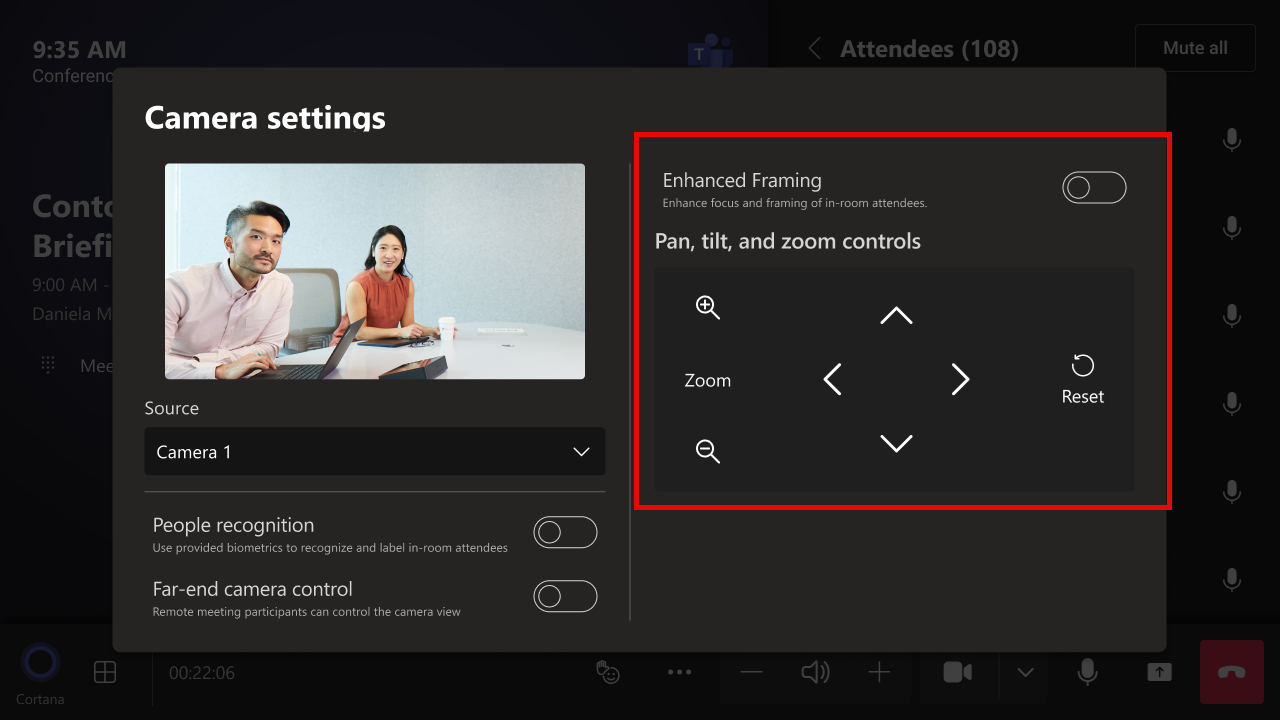
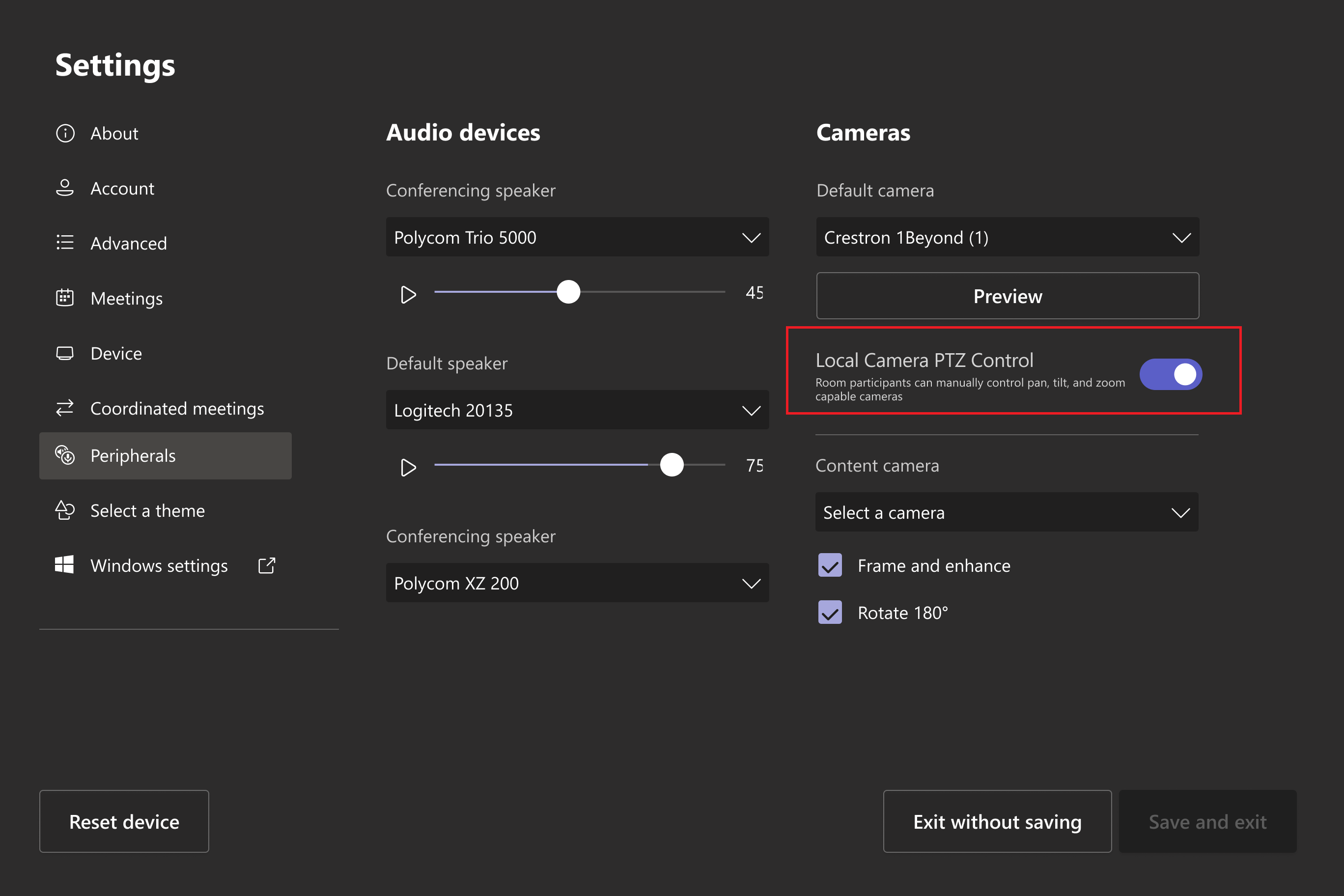
Updated September 15, 2026: We have updated the timeline. Thank you for your patience. Microsoft Teams Rooms on Windows will soon support native PTZ (pan-tilt-zoom) controls for cameras capable of supporting PTZ controls. The PTZ controls will appear in the Camera settings pop-up menu when the Enhanced Framing toggle is set to off. This message is associated with Microsoft 365 Roadmap ID 409534. [When this will happen:] General Availability (Worldwide, GCC): We will begin rolling out late September 2026 (previously mid-September) and expect to complete by early November 2026 (previously late July). General Availability (GCC High, DoD): We will begin rolling out early December 2026 (previously mid-October) and expect to complete by early January 2027 (previously mid-November). [How this will affect your organization:] Before this rollout: Native PTZ controls are not displayed in Camera settings pop-up menus for PTZ-capable cameras. After this rollout: Admins will be able to toggle this feature for each Teams Rooms on Windows in the device’s Admin Settings for Peripherals. This setting will be on by default. Local PTZ controls in the Camera settings pop-up menu for supported cameras when Enhanced Framing is disabled:
Users in a Teams Rooms on Windows with a PTZ-capable camera connected will see PTZ controls in the Camera settings pop-up menu. Admin toggle for the local PTZ control in Settings > Peripherals:
[What you need to do to prepare:] This rollout will happen automatically by the specified date with no admin action required before the rollout. You may want to notify your users about this new capability and update any supporting documentation for your users. Before rollout, we will update this post with revised documentation. |
| Machine Translation |
2026年9月15日更新:タイムラインを更新しました。ご辛抱いただきありがとうございます。 Windows版Microsoft Teams RoomsはまもなくPTZコントロール対応カメラ向けにネイティブのPTZ(パンチルトズーム)コントロールをサポートします。Enhanced Framingトグルがオフにすると、PTZコントロールはカメラ設定のポップアップメニューに表示されます。 このメッセージはMicrosoft 365ロードマップID 409534に関連付けられています。 [いつ起こるか:] 一般公開(世界、GCC):2026年9月下旬(以前は9月中旬)に展開を開始し、2026年11月初旬(以前は7月下旬)までに完了する予定です。 一般稼働開始(GCC High、国防総省):2026年12月初旬(以前は10月中旬)に展開を開始し、2027年1月初旬(以前は11月中旬)までに完了する予定です。 [これがあなたの組織にどのような影響を与えるか:] この展開前:PTZ対応カメラのカメラ 設定 ポップアップメニューにはネイティブPTZコントロールが表示されていません。 この展開後:管理者はWindowsの各Teams Roomsでこの機能をデバイスの周辺機器管理 設定 で切り替え ることができます。この設定はデフォルトで有効になります。 強化フレーミングが無効化された場合、カメラ設定のポップアップメニューにある対応カメラのローカルPTZコントロール:
WindowsのTeams RoomsでPTZ対応カメラが接続されている場合、 カメラ設定 のポップアップメニューでPTZコントロールが表示されます。 周辺機器設定のローカルPTZ制御の管理者切り替え >:
[準備のためにやるべきこと:] このロールアウトは指定された日までに自動的に実施され、事前の管理者の操作は不要です。この新しい機能についてユーザーに通知し、サポートドキュメントを更新することをお勧めします。 展開前に、改訂されたドキュメントでこの投稿を更新します。 |