SHD / MC Checker

MC1238432 | (Updated) Microsoft 365 Copilot app: Branded footer customization


MC1238432 | (Updated) Microsoft 365 Copilot app: Branded footer customization

Classification stayInformed
Last Updated 09/17/2026 21:10:50
Start Time 02/25/2026 01:16:32
End Time 10/26/2026 07:00:00
Message Content

Updated September 17, 2026: We have updated the content. Thank you for your patience. 

[Introduction]

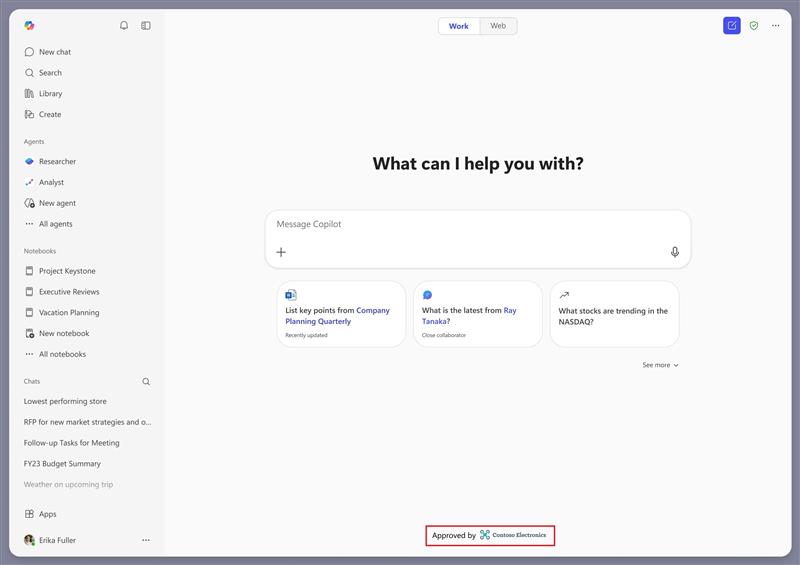
We’re introducing a new co-branding capability that will allow organizations to display a branded footer at the bottom of the Chat screen in the Microsoft 365 Copilot app. This update will enable admins to add their organization’s logo to their users’ Microsoft 365 Copilot app, helping users confirm they are using their trusted, work-managed Copilot experience.

This message is associated with Microsoft 365 Roadmap ID 555852.

[When this will happen]

  • General Availability (Worldwide): We will begin rolling out August 2026 (previously mid-July) and is expected to complete by mid-September 2026 (previously end of July).

[How this will affect your organization]

Who is affected

  • All Microsoft 365 tenants using the Microsoft 365 Copilot app.

What will happen

  • Admins will be able to upload a logo in the Microsoft 365 admin center to customize the footer in the Microsoft 365 Copilot app.
  • The footer will use the same logo configured in your organization’s theme for other Microsoft 365 apps. Only the logo will be used; other theme settings will not apply in this release.

    user settings

  • Admins can choose a footer label: Approved by, Provided by, or Managed by. Selecting No label will display the logo without a label.
  • This feature will be off by default and will require admin configuration.
  • There will be no user impact unless an admin enables the footer.

[What you can do to prepare]

No action will be required unless you want to enable the branded footer.

Admins who want to configure this feature should:

  • In the Microsoft 365 admin center, go to Org settings > Custom theme and open your default theme.
  • Confirm that your organization’s logo is configured in the Logos tab. This is the same logo used for your organization’s branding in other Microsoft 365 apps.
  • Open the Copilot Chat tab and select Add your brand to Copilot Chat footer area.
  • In the Footer style dropdown, choose No label, Approved by, Provided by, or Managed by.
  • Save your changes to display your logo in the branded footer in the Microsoft 365 Copilot app.

Please note: The footer currently uses your organization’s default theme and applies to all users. Targeting different logos to specific user groups will be supported in a later update.

For configuration guidance: Customize the theme for your organization | Microsoft 365 | Microsoft Learn

[Compliance considerations]

No compliance considerations identified. Review as appropriate for your organization.

Machine Translation

2026年9月17日更新:内容を更新しました。ご辛抱いただきありがとうございます。 

[はじめに]

Microsoft 365 Copilotアプリのチャット画面下部にブランドフッターを表示できる新しい共同ブランディング機能を導入します。このアップデートにより、管理者は自社のロゴをユーザーのMicrosoft 365 Copilotアプリに追加でき、信頼できる職場管理型Copilot体験を使用していることを確認するのに役立ちます。

このメッセージはMicrosoft 365ロードマップID 555852に関連付けられています。

[いつ起こるか]

  • 一般公開(世界):  2026年8月 (以前 は7月中旬) に展開を開始し、 2026年9月中旬 (以前 は7月末)までに完了する予定です。

【これがあなたの組織にどのような影響を与えるか】

影響を受ける人物

  • Microsoft 365のテナントはMicrosoft 365 Copilotアプリを使用しています。

何が起こるのか

  • 管理者は Microsoft 365管理センター にロゴをアップロードし、 Microsoft 365 Copilotアプリでフッターをカスタマイズできます。
  • フッターは、他のMicrosoft 365アプリでも組織のテーマで設定された同じロゴを使用します。ロゴのみが使用されます。このリリースでは他のテーマ設定は適用されません。

    user settings

  • 管理者はフッターラベルを選択できます: Approved by、Providing by、またはManaged by。「 No label 」を選択すると、ラベルなしのロゴが表示されます。
  • この機能は デフォルトでオフ になり、管理者設定が必要です。
  • 管理者がフッターを有効にしない限り 、ユーザーへの影響 はありません。

【準備のためにできること】

ブランドフッターを有効にしたい場合は、何の操作も必要ありません。

この機能を設定したい管理者は以下のことをすべきです:

  • Microsoft 365管理センターで、組織設定>カスタムテーマに行き、デフォルトのテーマを開きます。
  • 組織のロゴがロゴスタブで設定されているか確認してください。これは他のMicrosoft 365アプリで組織のブランドに使われているロゴと同じです。
  • Copilotチャットタブを開き、「Copilotチャットのフッターエリアにブランドを追加する」を選択してください。
  • フッタースタイルのドロップダウンで、ラベルなし、承認者、提供者、管理者を選びます。
  • Microsoft 365 Copilotアプリのブランドフッターにロゴを表示するように変更を保存してください。

ご注意ください:フッターは現在、組織のデフォルトテーマを使用しており、すべてのユーザーに適用されます。特定のユーザーグループに異なるロゴをターゲットにすることは、今後のアップデートでサポートされます。

設定ガイダンスについては: 組織に合わせてテーマをカスタマイズする |Microsoft 365 |Microsoft Learn

[コンプライアンスの考慮事項]

コンプライアンス上の考慮事項は特定されていません。組織に応じた適切なレビューを行ってください。