| Message Content |
[What and why]
Organizations often use third-party applications such as ServiceNow, Workday, Jira, and others, but the corresponding Microsoft Teams apps and agents may not be enabled for users. As a result, users may switch between Teams and other applications even when
an integrated Teams experience is available.
With this feature, admins can discover Teams apps and agents that correspond to applications already being used in their organization. Recommendations are prioritized using usage signals, helping admins identify opportunities to make those Teams experiences
available to users already using the application, specific users and groups, or the entire organization. This helps bring existing business applications into the flow of work in Teams, reducing context switching and helping organizations realize more value
from their software investments.
[Rollout schedule]
- Targeted Release: Beginning in early November 2026 and expected to complete by
mid-November 2026
- General Availability (Worldwide, GCC): Beginning in early November 2026
and expected to complete by mid-November 2026
[Impact on your organization]
Who is affected
- Microsoft Teams administrators managing app and agent deployment
- Organizations using supported third-party applications that have corresponding Teams apps or agents
Platforms and services
- Microsoft Teams
- Teams admin center
- Teams apps
- Teams agents
What will happen
- Admins will see recommendations in the Teams admin center for Teams apps and agents associated with applications already being used in their organization:
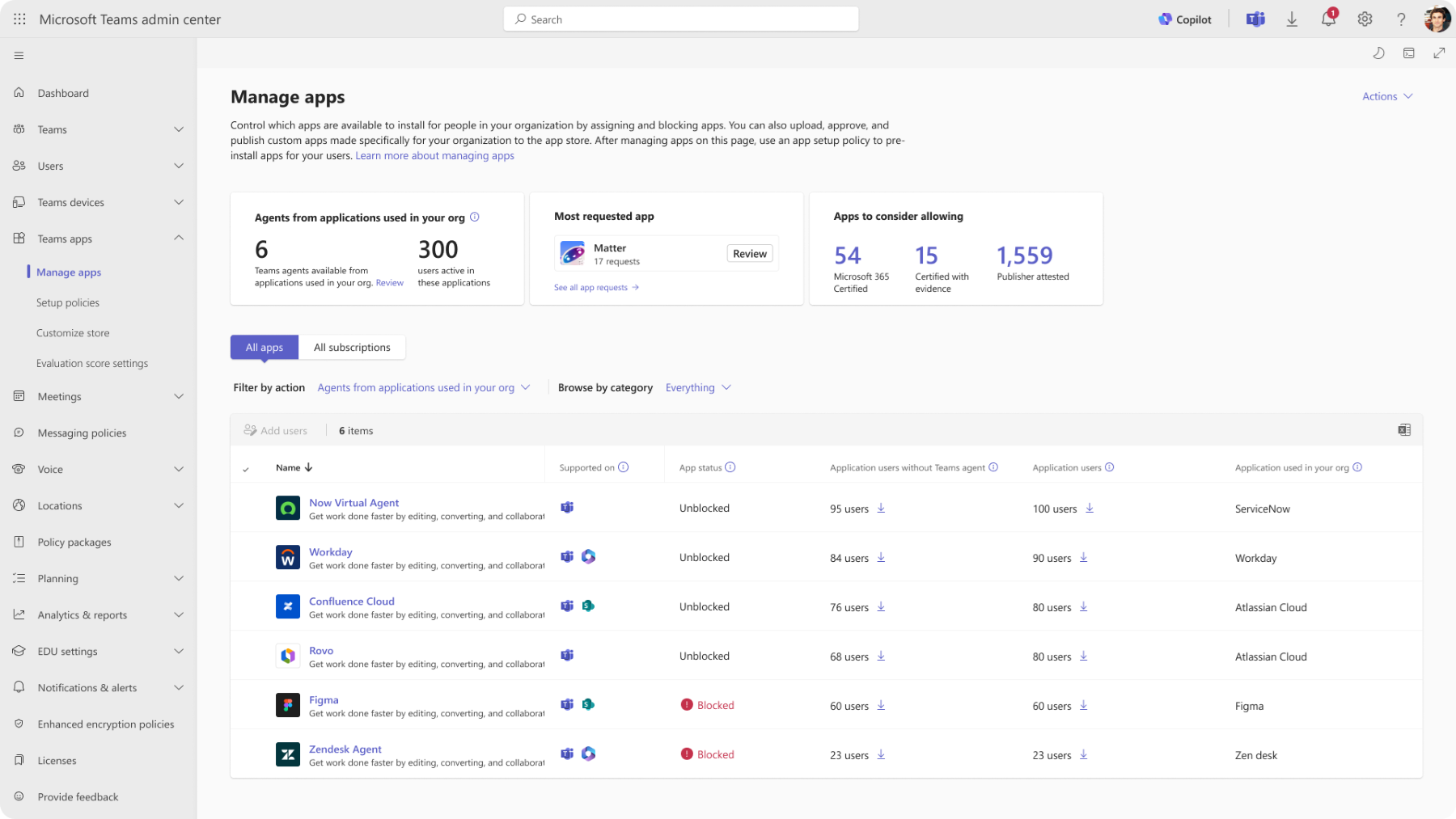
- Recommendations will include usage signals to help admins identify where a Teams app or agent may provide the greatest value.
- Admins can choose to make a recommended app or agent available to users already using the corresponding application, specific users and groups, or everyone in the organization.
- Admins can choose to install the app or agent for applicable users.
- No Teams apps or agents will be enabled automatically.
- Existing app availability and installation settings will not change unless an administrator takes action.
- Users may gain access to applications they already use directly within Teams, reducing the need to switch between applications.
[Action required and recommendations]
No action is required unless you want to use this feature.
- Review this feature before rollout and determine whether you want to enable it in the Teams admin center.
- If enabled, Microsoft will use signals indicating that users have signed in to applications within your organization to identify relevant Teams apps and agents and provide recommendations.
- Review recommendations in the Teams admin center and determine which apps or agents should be made available or installed for users.
- Communicate the change to Teams administrators responsible for app governance and deployment.
- Update any internal documentation related to Teams app management, if applicable.
[Compliance considerations]
| Question |
Answer |
| Does the change alter how existing customer data is processed, stored, or accessed? |
Microsoft uses application sign-in signals to identify relevant Teams apps and agents and generate recommendations. |
| Does the change introduce or significantly modify AI/ML or agent capabilities that interact with or provide access to customer data? |
The feature introduces agent-related capabilities and uses signals to recommend Teams apps and agents. |
| Does the change add any integration to third-party software products? |
Recommendations are based on applications already in use, including third-party applications such as ServiceNow, Workday, and Jira. |
| Does the change include an admin control, and can it be controlled through Entra ID group membership? |
Admins must enable the feature and can target specific users or groups when enabling apps or agents. |
|
