SHD / MC Checker

MC1484010 | Microsoft Teams: Hide organizer names in calendar view on Teams Panels


MC1484010 | Microsoft Teams: Hide organizer names in calendar view on Teams Panels


Classification stayInformed
Last Updated 10/13/2026 16:48:49
Start Time 09/30/2026 22:59:03
End Time 11/23/2026 08:00:00
Message Content

[What and why]

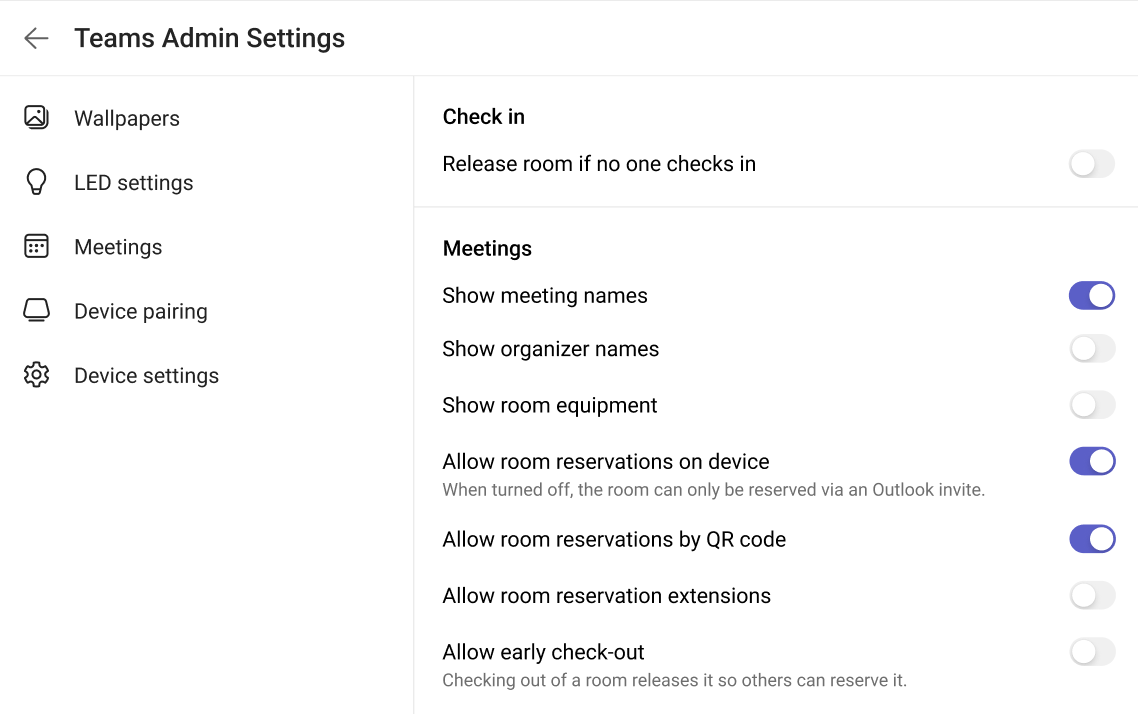
Microsoft Teams Panels will introduce a new administrator setting that allows administrators to choose whether organizer names are shown in Calendar View on Teams Panels.

Admins can toggle the Show organizer name setting ON or OFF in the Teams Rooms Pro Management portal or on the panel device. When organizer names are hidden, the organizer name is not shown in Calendar View on the panel device.

This feature is available with Teams Rooms Pro and Teams Shared Spaces licenses.

[Rollout schedule]

  • General Availability (Worldwide): Beginning in early October 2026 and expected to complete by early October 2026

[Impact on your organization]

Who is affected

  • Administrators who manage Microsoft Teams Panels
  • Organizations using Teams Rooms Pro licenses
  • Organizations using Teams Shared Spaces licenses
  • Users who view meeting information on Teams panel devices

Platforms and services

  • Microsoft Teams Panels
  • Teams Rooms Pro Management portal

What will happen

  • A new setting, Show organizer name, will be available for Teams panel devices.
  • Administrators can choose whether organizer names are displayed in Calendar View.
  • The setting can be configured from the Teams Rooms Pro Management portal or directly on a Teams panel device.
  • By default, organizer names will continue to be displayed in Calendar View.

[Action required and recommendations]

No action is required if you want organizer names to continue appearing in Calendar View on Teams panel devices.

If you want to hide organizer names:

  • Review your room privacy and display requirements.
  • Update the Show organizer name setting in the Teams Rooms Pro Management portal or on individual Teams panel devices.

Learn more

[Compliance considerations]

Question Answer
Does the change include an admin control, and can it be controlled through Entra ID group membership? Yes. Administrators can enable or disable the display of organizer names on Teams Panels. The available information does not indicate support for management through Entra ID group membership.

Machine Translation

[何となぜ]

Microsoft Teams Panelsでは、管理者がTeamsパネルの カレンダービュー にオーガナイザー名を表示するかどうかを選択できる新しい管理者設定を導入します。

管理者はTeams Rooms Pro管理ポータルやパネルデバイス上で「 オーガナイザーの表示」 設定をオンまたはオフに切り替えることができます。オーガナイザー名が非表示の場合、パネルデバイスのカレンダービューにはオーガナイザー名が表示されません。

この機能は、Teams Rooms ProおよびTeams Shared Spacesのライセンスで利用可能です。

[展開スケジュール]

  • 一般公開(世界):2026年10月初旬から始まり、2026年10月初旬までに完了予定です

[組織への影響]

影響を受ける人物

  • Microsoft Teamsパネルを管理する管理者
  • Teams Rooms Proライセンスを使用している組織
  • Teams Shared Spacesライセンスを使用している組織
  • Teamsパネルデバイスで会議情報を閲覧するユーザー

ホームとサービス

  • Microsoft Teamsパネル
  • Teams Rooms Pro Managementポータル

何が起こるのか

  • Teamsパネルデバイス向けに新しい設定「 Show organizer name」が利用可能になります。
  • 管理者は カレンダービューでオーガナイザー名を表示するかどうかを選択できます。
  • 設定はTeams Rooms Pro管理ポータルから設定するか、Teamsパネルデバイス上で直接設定できます。
  • デフォルトでは、オーガナイザー名は カレンダービューに引き続き表示されます。

[行動が必要と提言]

Teamsのパネルデバイスのカレンダービューにオーガナイザー名を表示し続けたい場合は、何の操作も必要ありません。

オーガナイザーの名前を隠したい場合:

  • 部屋のプライバシーやディスプレイの要件を見直しましょう。
  • Teams Rooms Pro Managementポータルや各Teamsパネルデバイスで Show Organizer名 の設定を更新してください。

詳しくはこちら

[コンプライアンスの考慮事項]

質問 回答
変更には管理者権限が含まれていますか?また、Entra IDのグループメンバーシップを通じて管理できますか? はい。管理者はTeamsパネルでオーガナイザー名の表示を有効または無効にできます。利用可能な情報では、Entra IDグループメンバーシップによる管理のサポートは示されていません。